

- cross-posted to:
- [email protected]
- cross-posted to:
- [email protected]
a year old, but interesting to read
You must log in or register to comment.
Telefonica is a Spanish ISP tho. It does operate in Germany, but the ISP is spanish. It’s in the name c’mon.
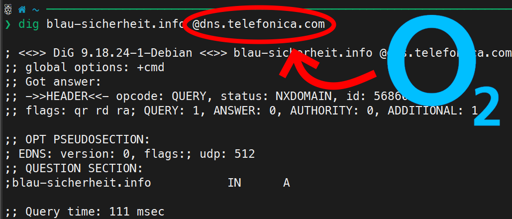
So why isn’t this an article in regional and national newspapers, showing the rather sinister behavior of an organization that works to silence the free flow of information?
Ey, du hast Linux installiert, du weißt ganz genau was du machen musst. Ändere einfach deine DNS Einstellungen, sodass du nicht mehr das DNS durch den Router beziehst.
okay but I still need detailed instructions to follow step by step :(
https://support.nordvpn.com/hc/en-us/articles/20094975629585-Change-your-DNS-servers-on-Linux
8.8.8.8 is Google dns and pretty quick. You can also search to find some more privacy focused dns servers (but always remember if you aren’t paying for it you’re the product).
No. Not enough, still often overridden by router or whatever.
Edit
/etc/NetworkManager/NetworkManager.conf:[main] dns=0 rc-manager=unmanagedFull file I suggest
# Configuration file for NetworkManager.
# See "man 5 NetworkManager.conf" for details.
[main]
hostname-mode=none
dns=0
rc-manager=unmanaged

[device]
wifi.scan-rand-mac-address=yes

[connection]
ethernet.cloned-mac-address=random
wifi.cloned-mac-address=random
connection.mdns=0
connection.llmnr=0

[ipv6]
addr-gen-mode=1
ip6-privacy=2
And disable/delete “Avahi”.
Restart NetworkManager twice. If you don’t know how, restart the computer twice. No, I don’t know why twice. Now, edit
/etc/resolv.conf:nameserver 2001:470:1f15:b80::53 nameserver 91.190.185.43Servers grabbed from here: https://servers.opennic.org/ (OpenNIC itself is kinda barely holding but the servers are pretty good).
Note that your browser will ignore this. Open up Firefox (or derivative), Settings, Privacy and security, DNS over HTTPS, Own settings, Own, and paste something like
https://dns1.slowb.ro/dns-queryinto it. Again, you can grab a server from opennic (look into description for URL). No, you cannot use opennic.glue addresses here.Now, note that this may still be tampered with, if your ISP/government cares enough. Not in the browser, but system wide yes. In this case, you will have to use dnssec-proxy, route your DNS over I2P/Tor OR run your own resolver. In all of these scenarios, you will have to make sure the program providing it is listening on port 53 (and nothing else is taking it) then just make
/etc/resolv.confthis instead:nameserver ::1 nameserver 127.0.0.1Obviously, all of this only affects DNS tampering and nothing else.
I use NextDNS. I’d pay but don’t exceed the limit of queries. Who has a paid option that are not assholes. (Love that sweet domain filtering)
If you have a spare raspberry pi and don’t mind an afternoon to get everything setup you could do what I have which is adguard home using the OISD block list and any other dns requests get resolved by unbound running on the same hardware so you’re your own dns server.
I would more recommend Quad9 instead of google. It also has some Addblock and anti tracker functionality, it also supports dns sec and dns over https. https://quad9.net/ Here the default dns resolver 9.9.9.9
I’m happily using dnsforge.de. Free ad blocking at the DNS level. Makes silly mobile games incapable of showing their ads as well, as a bonus. Much better environment for my kids, because these ads be TRIPPIN yo.
I’ll have to remember 9.9.9.9 instead of 8.8.8.8 The only reason I remember is someone said 8.x was owned by Amazon the other day and I had to look it up to make sure I wasn’t crazy.
CUII provides a great list of sites you’d definitely want to avoid these days. Especially if you use another DNS than the one of the ISP, which renders the blocks useless! Stay safe and make sure to regularly check their list of highly illegal sources for all kind of stuff so you are always up to date and know what to avoid as the law abiding citizen you are!
I don’t usually pirate content in spanish, but whenever someone asks me for it, I always go to the latest blocked domain list from the govt to find piracy sites. It’s such a nice and convenient list with all the latest sites.
I don’t even need to use a VPN, since most of the blocks are just DNS. I have my own DNS resolver using unbound at home, so none of those blocks affect me.
It’s a mixed bag - they are blocking some awesome piracy sites, but they are also blocking some scammy sites you really do not want to visit. Those FMHY lists floating around in the fediverse are a better starting point.
And the follow up post “Germany’s private internet censorship organization gives up” from around 5 months later.
lol, and all this was achieved by a talented 17 year old kid, and a few articles. there are still miracles in the world
Ya love to see it


