- cross-posted to:
- [email protected]
- [email protected]
- cross-posted to:
- [email protected]
- [email protected]
Honey, I Shrunk The Vids is an overengineered oversimplified system-agnostic frontend for FFMPEG. Built with assistance from Claude, but don’t let that stop you reading - I’ll explain why.
Predendum 6/MAR/26: Yes, I’m using genAI - specifically Claude - to help me build and improve this application. But, I believe I’m using genAI differently than the majority of projects. For one thing, I’m not blindly copy-pasting output and crossing my fingers that it works. I read the output, looking for things I know are wrong, and try to fix it; if I can’t, I ask what I’m doing wrong, and then I fix it. When I encounter errors, I’m reading the error output and if I know how to fix it I do it myself. I’m trying to actually learn, but I do that best by diving in and fixing the mistakes I make. I test informally* on the hardware I have available, which is two Windows PCs, and sometimes my friend with a 2016 Mac will do a test run for me to confirm stuff works. (*by “informally”, I mean I don’t write test cases. I know how, but they’re repetitive and I hate them and I’m not doing it for my personal projects or I’ll end up hating my hobbies.)
My goal in posting my projects is not to have other people audit my code for me, nor do I want kudos or approbation (except for any jokes you see. Those are all me). I’m posting what I’ve got when I’ve got it largely working, in case other people find it useful, and that’s it. I do hope that if people see something I could refactor or conventions I should be adhering to, they’ll drop me a (civil) note about it so I can keep it mind. I appreciate feedback and advice, but I’m not expecting it.
Thanks for reading, I hope you find HISTV useful!
This is a followup to a post I made yesterday, about a silly little Windows application I’d made for batch transcoding files. I wanted something that I could just dump my files onto without having to muck about with Handbrake or Tdarr - post here, for those curious: https://piefed.ca/c/selfhosted/p/568748/honey-i-shrunk-the-vids-a-windows-transcoding-frontend-for-ffmpeg
So I spent today making my silly little Windows application a silly little platform-agnostic application. I rewrote the whole thing in Rust and JavaScript with a webview frontend, and apparently Github lets you compile binaries for quite the range of target platforms, so I have compiled binaries available for Windows, Linux, and Mac (Intel/Apple Silicon). It’s got a dark theme because of course and a light theme because I guess, also it’s themeable because why the hell not. I’m pretty pleased with how it’s coming along - if anyone decides to give it a go, please let me know if you find issues!
screenshots
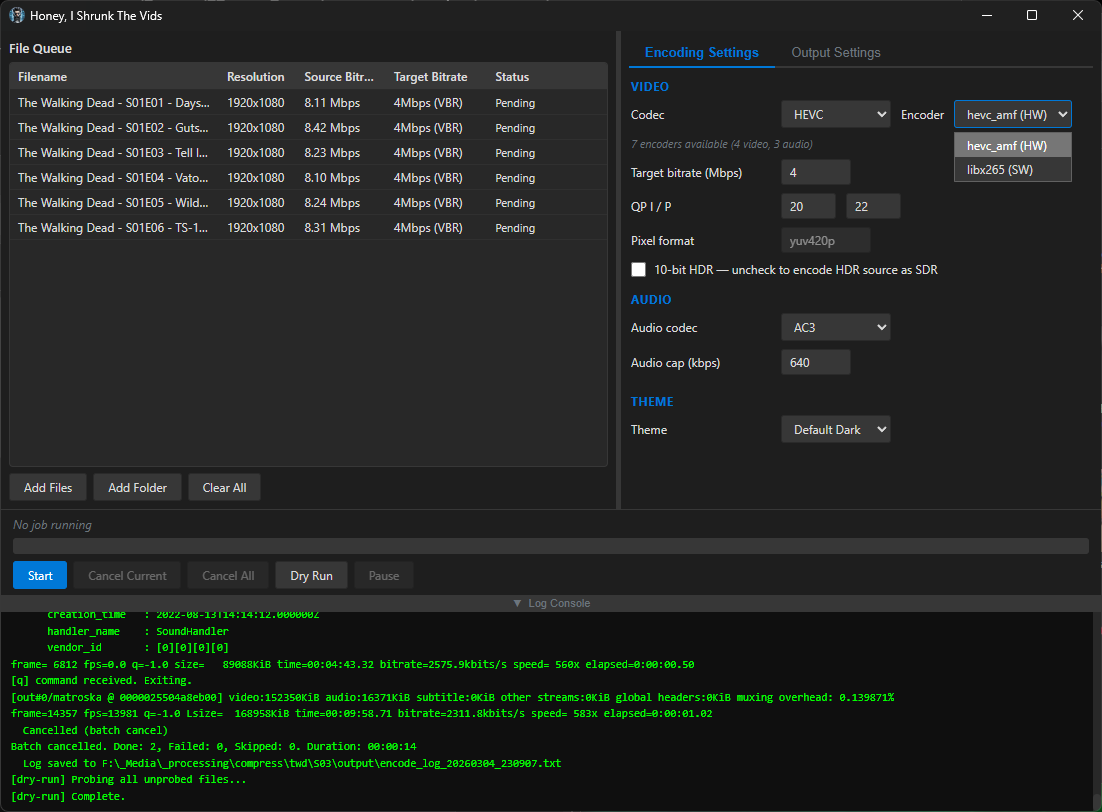
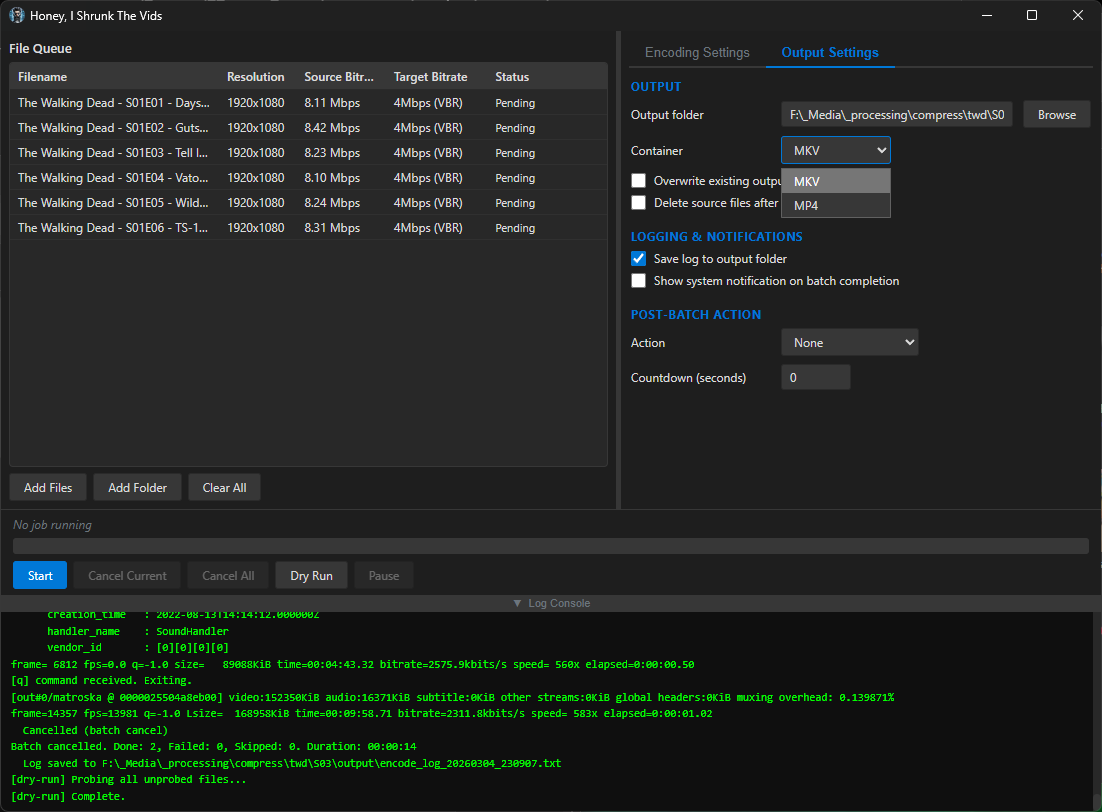
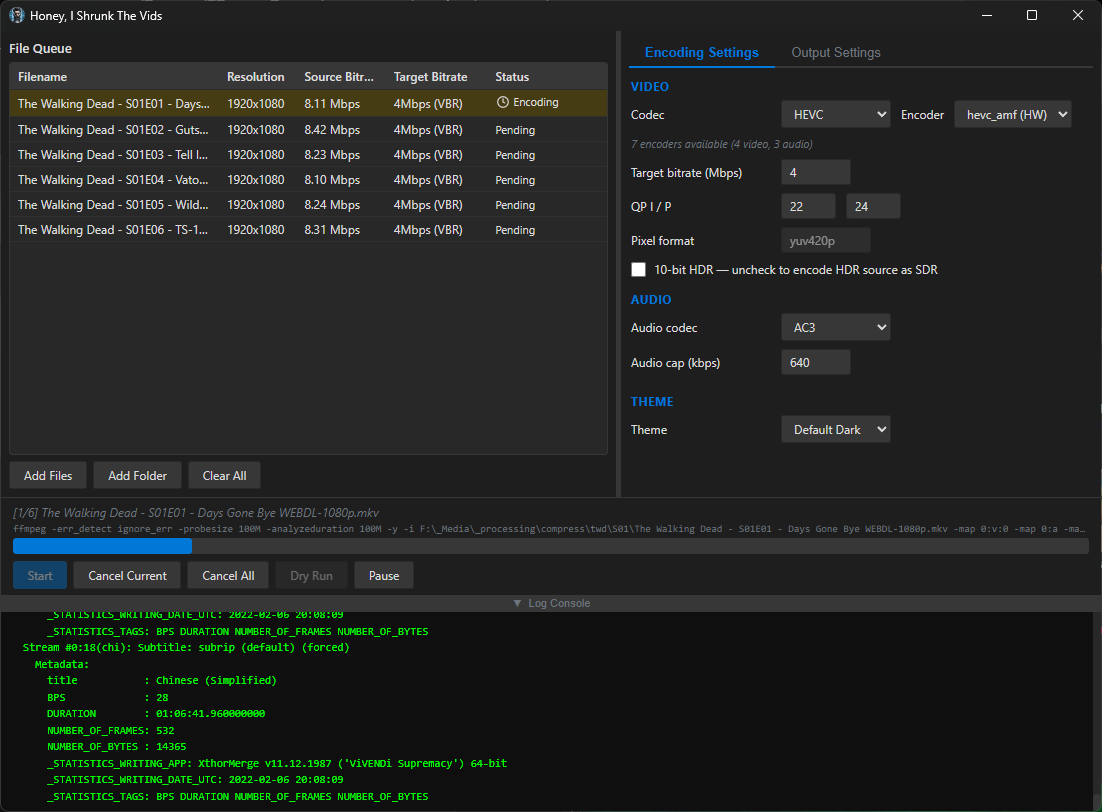
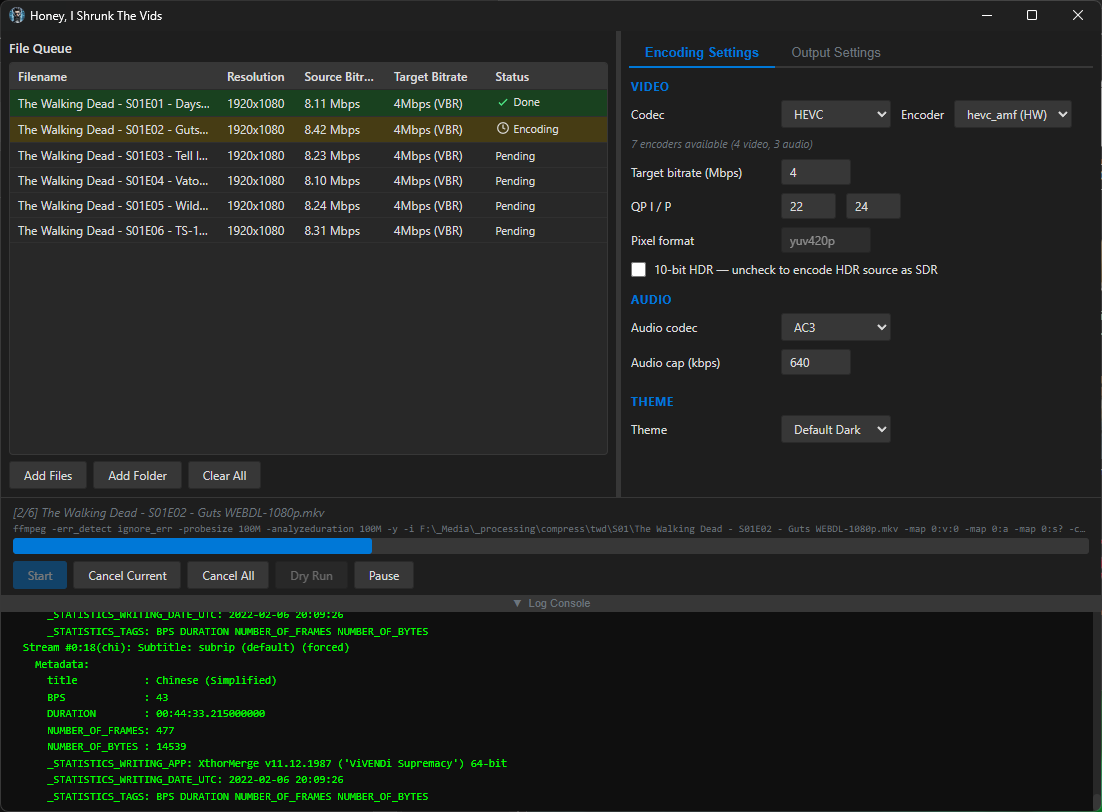
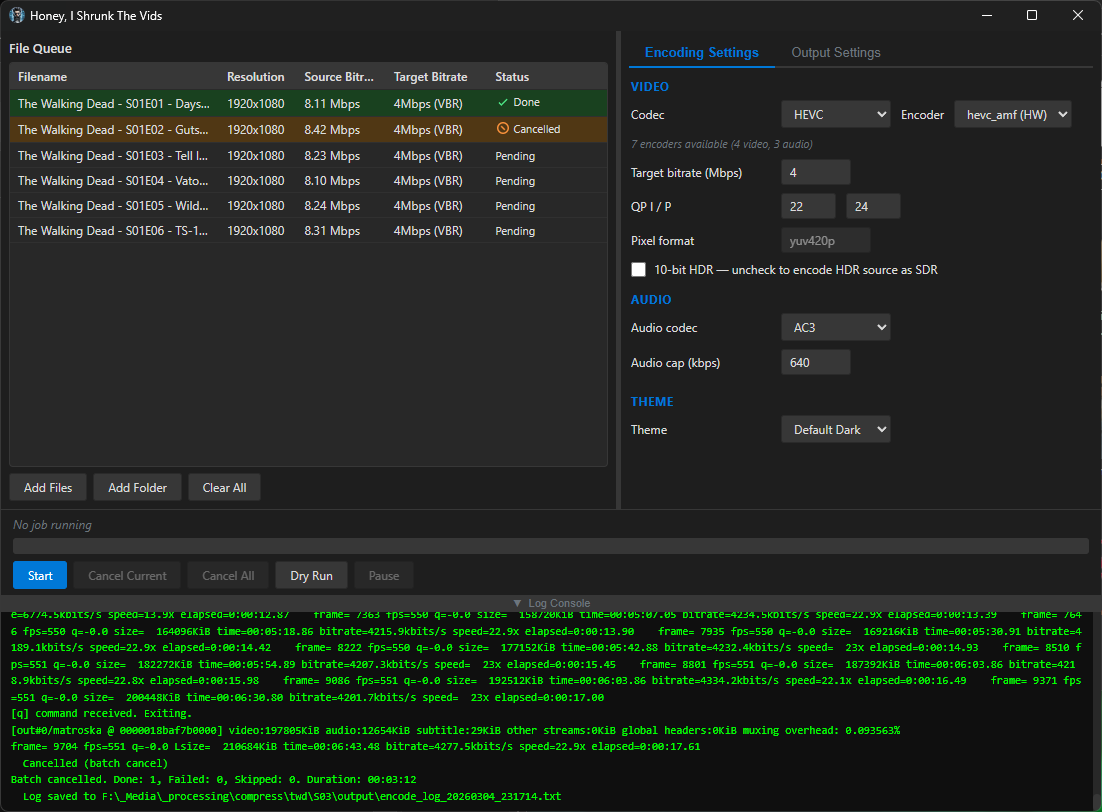
Compiled binaries can be downloaded at https://github.com/obelisk-complex/histv-universal/releases
You must log in or register to comment.
deleted by creator
Yes, I used Claude to help me build this, but it’s not “barely tested”. The major features all work, and they didn’t at first; I hunted down bugs, caught (some of) the mistakes the AI made, and manually applied fixes so I could be sure I understood what went wrong and why. This was first and foremost a learning experience for me. And I’m actively using this thing to batch transcode my media right now, because my learning experience has resulted in something that works.
If you find issues, by all means let me know and I’ll do my best to fix them. If you’re just here to be a jerk, I’m not interested.
No one is being a jerk here, stop being defensive.
What fixes did you apply. That’s what we want to know. It’s not a trick question.
- Did you use unit tests?
- Did you check the logic flow so that if I run this code x 10,000 on a ton of media, it isn’t using terribly inefficient settings that will make my 40h workload take two weeks?
- how are you deploying this thing?
If you want to present your project, be prepared to explain it. That is completely above board for us to ask.
I agree that the comment was rude. Specifically with the “barely tested” asumption/accusation.
Is it an assumption if there’s a complete lack of unit tests?
It’s fine, this is healthy discourse we all need to move forward. If we kick out all the vibe coders instead of discussing with them, we will never get them to adhere to any kind of pattern of behaviour.
No one is being a jerk here
Really? Literally the only thing they said was
Missing the ”made using AI, barely tested” disclaimer I see…
They didn’t ask a question. They just came out swinging, for no reason. You asked three questions, and I’m not going to call you a jerk for it. But just coming in here and making snide remarks? Absolutely being a jerk.
Now, your questions.
-
No, I didn’t use unit tests. I built this for my own personal use, and tested it on my system and my wife’s with files in a variety of containers encoded at a variety of bitrates with a variety of codecs - random crap we had laying around our hard drives, from the internet, from Steam and OBS records, from our phone cameras. This isn’t commercial software, I’m not asking for donations, and I made the license The Unlicense because I don’t want money or credit for it. I shared it because I got it working and I thought other people might find it useful too. I’m not going to exhaustively test it like I’m taking subscriptions, I hate testing. When I come across an issue, I fix it, and that’s the best I’m offering.
-
It’s FFMPEG in the backend, and it processes files sequentially. It encodes whatever you put in to HEVC MKV, or H264 MP4. You can set the QP settings for the quality you want. Explain where you expect inefficiency and how I can fix it, and I will.
-
I’m pushing from a local repo to my Github where it runs a job to compile the binaries for each platform, and to Codeberg where it’s not doing that (so I only have the compiled binaries at GitHub right now).
-
What fixes did I apply? Many. Some examples would be not successfully detecting available hardware, showing all available encoders rather than only the ones that would work with available hardware, failing to build (so many build failures), window sizing issues, options not showing, hanging on starting a job because the ffmpeg command was getting mangled, failing to find ffmpeg, unable to add files, unable to probe files, packet counting not working so “best guess” settings would result in larger files than the originals, that sort of thing.
And incidentally, the fact that this is a personal project I shared in case someone might find it useful is another reason that coming in here and throwing shade is a shitty thing to do. This isn’t Stack Overflow. If it’s no use to you, move on. If you have constructive criticism, let’s hear it. If you can do it better, go ahead. But why try to make me feel bad about it, because you don’t like the way I built it? I used spaces instead of tabs too, go get the fucking pitchforks.
Again, get off your high horse.
They just came out swinging, for no reason.
You already know how most self-hosted folks feel about vibe coding, or you wouldn’t have taken immediate offence to the initial comment (which ia valid, btw. You did not mark the project as vibe-coded or ai-assisted.) MARK YOUR PROJECT AS AI-ASSISTED.
Explain where you expect inefficiency and how I can fix it, and I will.
I’m looking to replace my cron-timed ffmpeg bash and ash scripts for encoding. Three of the four projects I looked at have double- and triple-work loops for work that should be done once. This seems to be a theme in vibe-coded projects.
And incidentally, the fact that this is a personal project I shared in case someone might find it useful is another reason that coming in here and throwing shade is a shitty thing to do.
Once again, I’m interested in the project, but I have my own thresholds of quality and security. If you can’t handle questions about your project, personal or not, then maybe don’t share it.
But why try to make me feel bad about it, because you don’t like the way I built it?
Sir/Madam, your feeling are your responsibility, not mine. I did not utter any pejoratives your way. Grow up.
Hey, replying again so you get a separate reply message. So like I said, I went looking for redundant loops and I found quite a few, just like you described. There was also a minor performance issue with the logic that built the FFMPEG argument; it used a lot of unnecessary flags, each of which required fresh memory allocation. That would only be an issue in specific circumstances, like if you were encoding thousands of videos in quick succession… but that’s exactly the kind of issue you were talking about, so I asked for and implemented the fix.
It does seem snappier. I’m pushing 1.0.9, which has the fixes beyond what I found from your comments (I fixed the ones you prompted me to find in 1.0.8). If there’s anything else you’d recommend I look at, I’m all ears.
Nice.
The issues to look for are unnecessary logic (evaluating variables and conditions for no reason), and double sets of variables.
One of the seasoned devs I work with said she encourages coders to transpose work at major inflection points, and this helps all devs gain an understanding of their own code. The technique is simply to rewrite/refactor the code in a new project manually, changing the names of the variables and arrays. The process forces one to identify where variables and actions are being used and how. It’s not very practical for very big projects, but anything under 1000 lines would benefit from it.
Good luck.
That’s very similar to what I’ve been doing 😊 This project I think is on the cusp, a few of the files are over a thousand lines but it’s still kinda manageable. Comparatively, the PowerShell script I started with was far simpler. That one I actually did write most of it because I know how to get stuff done in PowerShell - just needed Claude’s help with the GUI.
Also, I was thinking about your comment on performance when you’re looking at tens of thousands of runs - definitely not my original intent for this, I figured anyone doing that would just use CLI, but it’s totally possible with HISTV. I added an option to put files in /outputs, path relative to the input file, so you totally could just drag a top level folder info the queue, it’ll enumerate the media in all the subdirectories, and hit start. You’d get the transcoded files right next to the originals in your folder structure so they’re easy to find. Useful, I hope, when doing that many jobs.
And thanks to your advice, it’ll do so a lot more efficiently. Like 5-6x lower resource usage, now. I really do appreciate the feedback, it’s exactly the kind of pointers I was hoping for when I posted this. I wish you’d come in to the comments outside my emotional response to someone else :P
Again, get off your high horse
I’m on a high horse? You’re the one riding in here yelling at me for not conforming to your arbitrary rules I didn’t know about, and defending someone who did nothing but insult me.
You already know how most self-hosted folks feel about vibe coding, or you wouldn’t have taken immediate offence to the initial comment (which ia valid, btw. You did not mark the project as vibe-coded or ai-assisted.) MARK YOUR PROJECT AS AI-ASSISTED.
No, I don’t know any such thing, I took offense to the implication that there was no effort put into this, and the absolute absence of any constructive criticism whatsoever. And again, I didn’t agree to your rules, and I don’t owe you anything, so take you imperious commands somewhere else, thank you very much.
I’m looking to replace my cron-timed ffmpeg bash and ash scripts for encoding. Three of the four projects I looked at have double- and triple-work loops for work that should be done once. This seems to be a theme in vibe-coded projects.
See, this is something I can actually work with. I’m looking for places that unnecessary probes get spawned for example - there are some that are necessary for the way I want this thing to work, but there’s one just for audio data when previous probes already get that. A useful observation that resulted in an improvement. Thank you.
Once again, I’m interested in the project, but I have my own thresholds of quality and security. If you can’t handle questions about your project, personal or not, then maybe don’t share it.
First of all, I’m going to say this very clearly so maybe it gets through: I am not mad about questions. I am mad about insults and a lack of questions. Thank you for your attention to this matter 🤦 Next: Your thresholds are your responsibility, I didn’t know about them when I built this and I didn’t build it for you, I’m sharing it and you happened to stop by. I appreciate your observations on issues to watch out for when I’m using genAI code, I will be keeping an eye out for duplicated loops and other issues in future projects.
Sir/Madam, your feeling are your responsibility, not mine. I did not utter any pejoratives your way. Grow up.
You have issued a few helpful specifics and otherwise roundly shouted at and condescended to me. You have a few things to learn about living in a civil society, based on how you treat strangers who are trying to learn new skills. Grow up.
deleted by creator
I really need to stick to my rule of taking a day to think before I respond.
So here’s the thing, I understand why people would want me to label my posts as AI-assisted. I’m sure there are a lot of people who just ask the AI to build them a thing, slap it all together, and throw it up on the internet as a finished project, and it’d be exhausting to be looking at the 95th slopbucket of a codebase and realise you’ve been bamboozled again by genAI.
I’m explicitly trying to not be that guy, so here’s what I’m doing. I’ve added a preamble to the post disclaiming this project is AI-assisted, and why I think it’s fair to say I’m doing it differently than most. I’ll add something like that to my other post now, and I’ll include clean it up to include a shorter boilerplate version in future posts. It’s the internet, nobody knows me, so it’s only fair to introduce myself!
If you have any advice or feedback to contribute, I’d genuinely appreciate it - it’s just easier for me to take on board if I don’t have to fight through emotional dysregulation to read it.
-
This sound awesome and i’d love to try but, your GitHub link delivers a 404.
Also you hosted the original project on Codeberg but this on GitHub. Is it because of GitHubs ability to build binaries for a wide range of systems or because of Codebergs latest availability issues?
Edit: Found the issue and the link you meant thanks to another commenter, fixed!
And, it’s actually also on Codeberg: https://codeberg.org/dorkian_gray/histv-universal
But yes, I did create a GitHub account just because it can build binaries for a wide range of systems; the binaries are currently only available on Github. I’m trying to figure out how to create a release on Codeberg, but if it’s in the Tags, every time I click into one I get a 502 Bad Gateway, soooo… I think it’s safe to say that I have been running into Codeberg’s availability issues, and I’m now glad I’ve got both 😅
It loads fine for me! It seems like it’s just an issue with the commenter’s setup
The problem is that the . (full stop) at the end of the sentence is also in the hyperlink.
Good catch! Didn’t see til I looked at it on my phone, wasn’t happening on my desktop. Fixed.
I haven’t seen an app name that funky since the late 90s or so with Nero Burning Rom. 😃
lol I’ll take that as high praise, as everyone knows the 1990s were the peak of our civilisation!

Built with assistance from Claude, but don’t let that stop you reading

No worries, go ahead and block me - I’m already returning the favour.
I was doing a lot of manual re-encoding down from insane source bitrates with FFMPEG
Thank you for your service
I’m starting to run low on space with my media server, this could be a good way to forestall having to buy hard drives that don’t suck!
Transcoding media is great for saving space. My server has but a humble ancient 1TB hard drive (shared with other storage uses). From a DVD (mpeg2), an episode of this one TV show is 1.6-1.8 GB. After transcoding to AV1, it’s 200-400 MB, and I can’t tell the difference in quality. (consider that’s per episode so over an entire series that’s many GB of space saving!)
I use Veronica Explains’ helpful HandBrake guide, she provides some settings for AV1, which work very well for me (I just saved it as a new preset).
https://vkc.sh/handbrake-2025/
And you can do batches of files by opening a directory and adding all. I haven’t tried OP’s tool so I don’t know how it compares to HandBrake, but that works fine for my use case.
This looks promising! My main use case is Jellyfin through Android TV, and it looks like AV1 has support for that. I currently have about 6 Tb of kids cartoons that are eating up most of my media server, would be great to shrink those slightly.
I think before I try this, I’ll want to spring for an offline backup of the library, then begin transcoding… I need one anyway, at least now I’m excited enough to actually do it!
My advice would be to try transcoding one or two media files first, and test the transcode on different devices. HISTV gives a lot fewer options than Handbrake, but the idea is minimal effort, maximal compatibility.
Specifically, AV1 is a newer standard, and not supported on devices older than ~2020 I think. HEVC (aka x265) produces slightly larger files but works on devices back to 2016 or so, and MP4/H.264 gives yet bigger files but compatibility goes back even further.
For video file size the main things you want to set are the target bitrate and, secondarily, the QP numbers: https://www.w3tutorials.net/blog/what-s-the-difference-with-crf-and-qp-in-ffmpeg/#quantization-parameter-qp-definition--how-it-works
For good quality at a reasonable size you can use the default values of 20/22 but to save a little more space you can probably bump these to 24/26. I went with QP instead of CRF because it’s better for streaming (while still giving better perceived quality than a constant bit rate).
As I say, Handbrake is great, does all this and more, but that was my problem with it - the controls look like something out of a space shuttle and I just don’t need all that most of the time 😅 I’d love to hear how you find using HISTV vs Handbrake, if you give it a go! 🙌
Thanks, I’ll remind myself to report back when I dive in! Ordered the backup drive today, so it’s already in motion. Like you I’m pretty laid back about my video editing work. Simple is good. I do edit a clip show for my kid every week these last two years so I’m at least slightly aware of these ideas, if only as a dilettante.
Hey, HISTV is showing a ton of promise right out the gates. Targeting 5mbps, I’m cutting anime episodes down from 2gb to 1gb with barely any noticeable change in quality. This is some gourmet shit, brethren.
Cool, I just tend to run one liners or little shell scripts but nice to see more of this stuff appearing.
Worth considering the backend too imo, as I imagine I’m not the only one here trying to leverage the most out of potatoes with not a lot of storage.
On my little n100 boxen for example having a building ffmpeg for the cpu/igpu to use hardware decoding gives ~5x the encode speed for a slightly larger filesize for hevc.
Well, good news - I got some pointers on places that genAI usually makes mistakes, so I’ve gone through a round of performance fixes for things like unnecessary worker duplications which - next to the actual encoding - I didn’t notice the impact of on my desktop.
As to using hardware encoding, HISTV runs a test render for hevc and h264 across amf, nvenc, and qsv - so pretty much, if your hardware supports it, HISTV will detect it and let you choose which encoder you want to use. You can even use libx264/libx265 by choice if you want to take advantage of the more efficient compression; doing so exposes a toggle for CRF if you’d rather use that than QP.
Wierd flex mentioning that its made with ai.
See, I got yelled at for not marking it as AI-assisted, and now you’re in here thinking it’s a flex! I just can’t win 😅
Probably (mostly) everyone hates ai generated stuff.
Yeah, I’m getting that; though this isn’t purely AI-generated. This is a working application that I’ve tested, have improved and plan on continuing to improve, and am currently using to transcode my media. There’s a lot more care and thought put into it than most people would expect on reading that it was created with the help of an AI model.
I put the disclaimer because I respect that serious developers who actually go look at the code would like a heads-up that it’s genAI before they waste their time reading it. But, I would like people to at least have a chance to read why I think my approach is different than most.
And, if you have videos to transcode, I’d love to hear what you think if you give it a go! I do actively fix bugs as well as add new features, so please do let me know if you try it and find an issue - I could use all the help testing it I can get 'cause my hardware to test on is quite limited.
This guy blocks everyone who doesn’t like his AI mess. Interesting
deleted by creator
It’s no worries mate, as mentioned I have no problem with questions!
So, reasons. Yes, this started as a line in powershell! That was my other post, linked at the top. I wrote the line, and after a few batches I decided to stop and use Claude to build a GUI for it. After I got that working and did a few runs with it, I started thinking about how useful this would be for a handful of other people in my life, and I wanted to package it into a .exe, partly so I could send them something simple to start but also just because I wondered if I could get it working. Never done it before. I still wanted to use it for myself because I have thousands of video files to transcode, and I didn’t want to have to manually tweak the command for every batch. I also didn’t want to have to rebuild it if I have more to do 6 months down the line - I’m lazy.
Then, later that night after I’d done a few batches with the powershell line-now-script, I thought to myself that Claude could probably help me build a frontend for it that didn’t rely on powershell, and then I started thinking about just making it a cross-platform application so my less techie friends can use it if they have big video files and want to save disk space. And then I got the bright idea to post it to the internet in case there are other less-techie users who aren’t my friends but who could still use it.
It’s got some smarts under the hood to detect any hardware encoders you have available, and will present only the encoders that your system can use; the options are INCREDIBLY constrained, because the idea isn’t to expose every option of FFMPEG - this is for quickly shrinking video files without even needing to know the difference between CBR and VBR. That’s because you and I think it’s easy to run an FFMPEG command from the commandline. But there are a lot of people of all different kinds of skill levels who have no idea how any of that works, and they’ll take one look at Handbrake and run screaming. This is for those people, too.
It also auto-downloads the latest FFMPEG and FFProbe from the official source if it doesn’t detect them on your PATH or in the folder with the executable - that saved my buddy who was helping me test it on his 2016 Mac, for example.
I was hoping to catch this before your replied, as I went and read the readme, then it made more sense. So I deleted my reply. But too late!
I have thousands of video files to transcode, and I didn’t want to have to manually tweak the command for every batch. I also didn’t want to have to rebuild it if I have more to do 6 months down the line - I’m lazy.
The cool thing is there isn’t much to put into a command that does stuff like this, unless you changing the FFMPEG parameters every time, but that would seem unlikely.
Yeah for sharing I get some of the bells and whistles.
What would be cool to have is a much better open source and free TV series renamer if you are looking for a future project!
I was hoping to catch this before your replied, as I went and read the readme, then it made more sense. So I deleted my reply. But too late!
All good! I’m actually enjoying talking about this thing with people who want to know more so I don’t mind at all _
The cool thing is there isn’t much to put into a command that does stuff like this, unless you changing the FFMPEG parameters every time, but that would seem unlikely.
So actually, that’s exactly the issue I was running into! I’d run a batch command on a whole folder full of videos, but a handful would already be well-encoded or at least they’d have a much MUCH lower bitrate, so I’d end up with mostly well-compressed files and a handful that looked like they went through a woodchipper. I wanted everything to be in the same codecs, in the same containers, at roughly the same quality (and playable on devices from around 2016 and newer) when it came out the other end, so I implemented a three-way decision based around the target bitrate you set and every file gets evaluated independently for which approach to use:
1. Above target → VBR re-encode: If a file’s source bitrate is higher than the target (e.g. source is 8 Mbps and target is 4 Mbps), the video is re-encoded using variable bitrate mode aimed at the target, with a peak cap set to 150% of the target. This is the only case where the file actually gets compressed.
2. At or below target, same codec → stream copy: If the file is already at or below the target bitrate and it’s already in the target codec (e.g. it’s HEVC and you’re encoding to HEVC), the video stream is copied bit-for-bit with -c:v copy. No re-encoding happens at all - the video passes through untouched. This is what prevents overcompression of files that are already well-compressed.
3. At or below target, different codec → quality-mode transcode: If the file is at or below the target but in a different codec (e.g. it’s H.264 and you’re encoding to HEVC), it can’t be copied because the codec needs to change. In this case it’s transcoded using either CQP (constant quantisation parameter) or CRF (constant rate factor) rather than VBR - so the encoder targets a quality level rather than a bitrate. This avoids the situation where VBR would try to force a 2 Mbps file “down” to a 4 Mbps target and potentially bloat it, or where the encoder wastes bits trying to hit a target that’s higher than what the content needs.
There’s also a post-encode size check as a safety net: if the output file ends up larger than the source (which can happen when a quality-mode transcode expands a very efficiently compressed source), HISTV deletes the output, remuxes the original source into the target container instead, and logs a warning. So even in the worst case, you never end up with a file bigger than what you started with which is much harder to claim with a raw CLI input. The audio side has a similar approach; each audio stream is independently compared against the audio cap, and streams already below the cap in the target codec are copied rather than re-encoded.
But yeah everything beyond that was bells and whistles to make it easier for people who aren’t me to use it haha.
I am 100% looking for more stuff I can build - let’s talk about it!
Hi, don’t mind the people hating on AI. Doesn’t matter if You use it as a tool to enhance your workflow without just blindly copying code. And it seems Ou so a lot of checking and thinking after the fact.
But those aspects don’t matter to people that have a fixed mindset and are convinced they are right and everyone doing it differently is wrong ( I think there is a name for that kind of condition…). You are vibe coding therefore you are stupid and need to either see the light or be buried. They are not rude, they are just trying to make you see the light! It’s always the same conversation. First downvotes, dismissive or outright rude comments and then you engage and try to have a civil conversation about something specific and then the goalposts start to move.
I get why some people have a radical position on AI but they need to learn that there are other positions too.
Yes AI is resource hungry but at the same time they are not vegetarians or vegans and drive a car and fly for holidays. Calculate them apples (emissions).
You made something you are proud of, you made it for yourself and you wanted to show and tell. Good on you! They are just bullies.
Thanks mate! It’s been a rough as hell week at work and getting it when I’m trying to share my hobby work with people was unexpected and a little demoralising, so your comment is really nice to read and much appreciated 😊
built with AI
Bye!
No no no, keep reading, it’s awesome!
It’s not, it’s slop
Byes
No worries, go ahead and block me - I’m already returning the favour.
Make sure to use AI for that!