What was that about Windows K2 again? Ah, who cares
They gave up, K2 is a tougher climb than Everest.
Set alarm for 10am
OK setting alarm for 20am
I think instead of the computer showing you the time, they should replace the clock program with a chat prompt so you can ask the computer to guess what the time is
Nadella won’t be satisfied until he maps everyone’s enter key to fuckong copilot.
Jesus Christ. First they fucked over notepad and introduced dozens of application breaking new bugs and broke decades of existing functionality, now they’re thinking about breaking the damn clock ?
Wait, no, they’ve already broken the clock in windows 11 because it no longer shows seconds, and doesn’t respond to clicks on non primary displays.
I guess they decided it wasn’t broken enough.
I’m getting so sick of their shit, and my employer locks down my laptop so tightly that I can’t run any 3rd party software too, so I can’t even install my own clock application.
Oh you want to see a fun win11ism? Use the calculator to determine the number of days between 2 dates.
Win 10: 2 fields you type in
Win 11: no typing is possible. You must click and scroll through a calendar ui for each date.
I didn’t even know the calculator could do that.
It borderline can’t now
It’s wild to me that clocks stopped responding on non-primary windows. The first time I noticed that I thought it was broken- and I was right, because there’s zero rhyme or reason for removing that functionality.
I don’t think they removed it, as such, it’s more that they rewrote the clock from scratch and didn’t know the old clock did that, and didn’t care to find out.
Similar to how task manager used to suppress the refresh if shift was being held down and that no longer works in Windows 11 because they rewrote it and never looked at Dave’s original code.
Is it your laptop, or theirs?
Can’t they just make tabbed file explorer work properly instead?
What’s wrong with tabbed file explorer? I haven’t run into any issues yet
There’s no way to automatically open new folders in a tab. You can right click but in windows 11 it’s hidden in the more options menu by default. You can overcome some of this with regedit but I only use windows for work and naturally I’m locked out of that.
There should at least be a shortcut for it.
Hello, this is the Linux comment
I’d switch if every discussion about Linux didn’t devolve into lengthy discussions about the complicated ways you need get anything working on it.
There are certain Linux distributions that come with all basics pre-installed and are designed to be convenient. All ubuntu derivatives, Mint, Pop_OS, Zorin etc. I know it because I use one and it’s just as convenient as Windows.
You can be sure these distributions will cause you no trouble because they are made by companies that put them in their computers or design them to be on pre-builts and therefore cannot be allowed to be difficult to use. For example, System76 developed Pop_OS to be used in their PCs. SteamOS is developed by Valve for the handheld console. These aren’t indie projects some hobbyists made.
For your programs, we now have flatpaks/snaps that make a program work even if it’s not developed specifically for your distribution. Valve developed Proton for its console, and it “translates” almost all games to Linux, including some games with anti-cheat. I have a library of 500+ games and they are all compatible. You can install any program with a click of a button, it’s just as easy as running an .exe file.
Fair.
There are about 30 different ways to do any single thing and whatever way you choose is guaranteed to provoke 17 neckbeards into writing essays on why you’re wrong and, while they’re at it, you also picked the wrong distro.
On the other hand:
- the clocks just tell time
- your user directory isn’t stored in a data center 1500 miles away
- the update process understands the concept of consent, and;
- you can create a local user account during install without … whatever this is.
There are about 30 different ways to do any single thing and whatever way you choose is guaranteed to provoke 17 neckbeards into writing essays on why you’re wrong and, while they’re at it, you also picked the wrong distro.
My favorite one is
“Oh linux is easy these days, you don’t have to even open the terminal”
“Haha noob why did you install the flatpak version, never do that, always install everything as .debs through terminal”You can just click on debs in your file manager, no different from an exe in that aspect… but sure, i guess you could run an exe via cmd if you really wanted to
Haha oh yes, it’s just whenever I search for some solutions it feels like I end up finding at least one reply with the instructions to use terminal only for installing
I’m old, and can’t be fucked learning a whole new system. I just want to browse the internet and play my games. The biggest barrier is getting my simracing gear and modded Assetto Corsa working on it.
Yeah, I completely understand. I bounced off Linux desktop several times and I’m a sysadmin.
It’s only the last few years where there have been rapid and significant improvements to get gaming so it “just works*” and both of the popular desktop environments, KDE (Windows-like) and gnome (Mac-like) have had a heavy focus on fixing all of the little fiddly annoyances that turned people off.
It’s not perfect and it can be annoying, but its dramatically better than it was 5 years ago while Windows keeps moving in the opposite direction.
I’m not trying to sell you on it really, Linus doesn’t pay me commissions. Windows isn’t THAT bad and learning a new OS is a big ask.
I’ve just been impressed by the state of things and enjoy yapping about it.
Obligatory “Gnome is NOT Mac-like” comment.
The Windows people think Gnome is Mac-like. Hah, no it’s not! Gnome is its own weird thing.
KDE can actually get a lot closer to Mac than Gnome can, if you add a top menu bar, rearrange some stuff, and move the titlebar buttons around.
(We came from Mac land originally, and that’s how we have our KDE set up. Mostly.)
– Frost
For most popular distros most stuff works out of the gate. It’s been a long time since I’ve had to wrestle with anything vexing.
The big one I see across most distros is: Pipewire needs better default minimum quants.
I see so many complaints about crackling audio and it’s almost always that pipewire defaults to using a tiny buffer for lower latency and system load (like gaming) can cause the buffers to empty resulting in crackling.
If this happens, you can fix it temporarily (it’ll last until you reboot):
pw-metadata -n settings 0 clock force-quantum 256Increase the 256 to 512 or higher until the crackling goes away (it doesn’t need to be a power of two, any integer will work). It’ll take effect immediately you don’t need to restart pipewire.
That depends on the distro, just choose one that’s beginner-friendly or “works out of the box”
LMDE, Zorin, etc.
Linux Mint is also great for new users.
That’s LMDE, except LMDE uses Debian for upstream instead of Ubuntu. It’s the same developers though.
OK, so tell me how to get Assetto Corsa Content Manager, Custom Shaders Patch and all the other mods I have installed, Quest 2 VR and Moza Pit House working in Linux, because that’s the thing keeping me from switching. Would WINE work well enough for that?
Ok, my coffee fueled morning research:
Essentially, if you can install the game with Steam it works out of the box. According to Protondb (https://www.protondb.com/app/244210) the game has a Gold rating which means it works without any major flaws.
-
There’s a guide to get Assetto Corsa setup: https://steamcommunity.com/sharedfiles/filedetails/?id=2828364666
-
If you don’t want to fuss with all of this manually, someone has created a script to do most of the work here: https://github.com/sihawido/assettocorsa-linux-setup
-
As far as mods, I’d need to know which other mods you use to see if there are any specific instructions/issues.
-
List of force feedback steering wheels, the driver needed to use them and a rating of how well they work with Linux. It looks like all Moza products have a Platinum rating so they work flawlessly. https://github.com/JacKeTUs/linux-steering-wheels
-
Moza Pit House doesn’t work, but someone has created a flatpak native Linux version: https://flathub.org/en/apps/io.github.lawstorant.boxflat
-
Here’s a compilation of links for software to get various pieces of simracing gear working: https://github.com/LukasLichten/awesome-linux-simracing
-
Steam VR via Quest 2 using ALVR: https://pawamoy.github.io/posts/steam-linux-alvr-quest2/
Legend! I’m saving this post for when I do finally get the motivation to switch.
The main mode I’m concerned about are Custom Shaders Patch and Pure, but I believe the DVDs are working on Linux versions of those as well.
If you do and run into any trouble, feel free to DM me. :)
-
I’ll legit look into this tomorrow. e: Done - https://lemmy.world/post/46306690/23526313
The answer is generally: Proton/Steam. There was a patch to WINE or Proton recently that made it much easier to use mods that require custom DLLs.
The core weird trick is understanding that there’s a directory for your game (once installed/setup in Proton) that’s essentially the C: drive. As far as your game is concerned, it’s running on Windows where it is the only non-system software installed.
So, any mods that are just scripts/plugins where you copy them into a folder then launch the game (anything without DLL, basically), you install the same way… But you use the directory, that contains the “C drive” for that specific game.
It sound complicated but once you do it once or twice it’ll feel familiar. You just now have a unique “C drive” directory for each game.
You can install/run multiple applications in the same bottle (basically what WINE calls the fake-c-drive-using windows environment). For example, when I play PoE2, I use a third party program to make trading easier. I just run that program inside the same bottle as the game and they think they’re both running on the same computer.
For basic things like installing and playing games on Steam it’s all handled automatically. You click the install button and then click the play button. Installing workshop mods is also exactly like in Windows. Steam just knows how to use WINE/Proton.
That approach doesn’t work for any game, tho. For example, I can’t get mods working for World of Tanks. If I move the mid files in the directory where they normally would be under Windows, WoT crashes when I start it.
For WOT/WOWS you should be ablt to run Aslains modpack installer inside of the wine prefix with protontricks: https://github.com/Matoking/protontricks
For the method that you’re using, you could enable proton logging and that would let you see the traceback of the crash. It may give you a bit more information about what it was trying to do when it crashed.
Not true. Standard Debian install on Thinkpad takes 15 Minutes. I don’t need more words.
How long can a discussion be about pressing a button to install a thing from the package manager, then launch said thing?
Motherf-
🤦🏻♀️
I started writing a clock app of my own because the Windows 11 clock app didn’t have a proper analog mode and it’s pretty useless. (Windows 3 clock app had analog mode, why not Windows 11?)
Some time ago I was ranting that instead of adding an analog mode, Microsoft will probably just pointlessly add Copilot to the clock app.
…Don’t blame me! I was just pointing out the obvious direction Microsoft is going for, whether we like it or not!
Aaaaanyway. This summer’s project is to figure out how the hell the Godot layout system works so I can make the layout responsive and I can release 1.1.
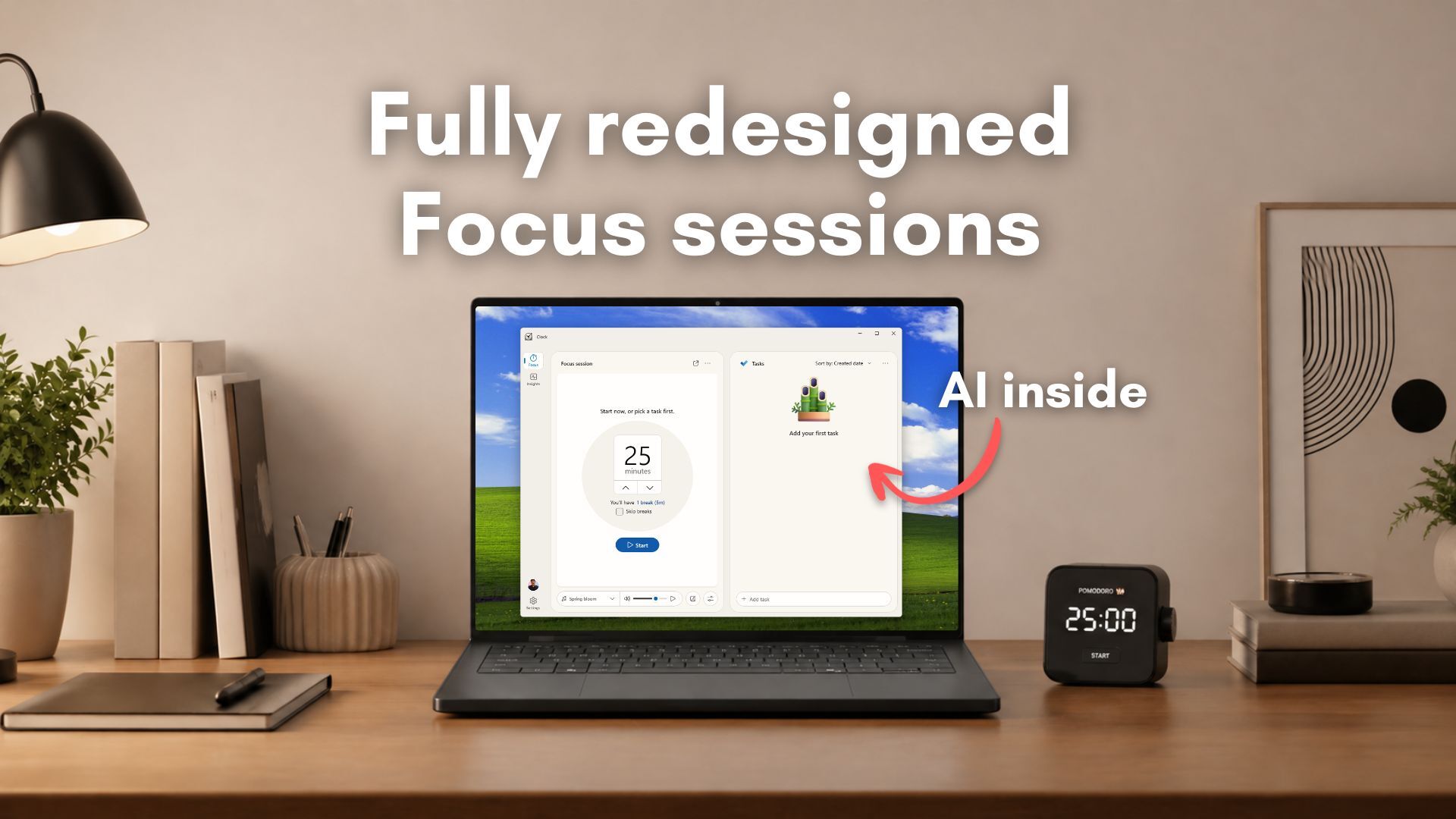
A system prompt hints at local AI-powered productivity features, specifically optimized for students. For example, the Clock app’s Focus session will act as a ‘Productivity’ assistant that breaks down tasks into clear, actionable steps, and it works by inferring the task category, then referencing the coursework of the student.
It would be great if there were a way to use AI to help people learn more effectively. But this feels like a way to train young people to become dependent on AI assistance for tasks/skills we humans used to be able to do well enough without AI. An addiction, rather than an assistant.
But why the clock app? I mean there is already Microsoft To-Do app specifically for reminders and tasks organisation…
The “old” clock app already had a Pomodoro feature (which I did not realize existed until recently) and you can argue this is a logical progression, I guess.
Absolutely. Those people will never develop the cognitive skills their degree is supposed to give them.
I read the article. What’s to hate? Looks like a decent update to my eyes.
It’s supposed to just be a clock.
So then don’t click it.
I steal your wife and if you get mad, just get another wife.
If she was using AI then she probably deserved it.
In the future, when Windows users say “advanced users can turn that crap off” they’ll mean the power button, not the group policy editor.
The clock should be used for entertainment purposes only
GPOs already suck and MS is forcing admins to adopt program rules out of Intune to get the same effect. See CoPilot GPO failures for further depth.
Instead of numbers it will show an AI-generated image of a text blur
Oh look , it’s Э o’clock
It’s actually 3:73.
0̴̡̧̢̡̢̛͖͕̲̞͉̻͈̤͎̟̻̪͍̙̥͉̺͚͐͐̀͛͐̑͐̌̆̀̇̋͆̏͗͌̐̔̊̕͜͝͠ͅͅ3̸̨̛͚͈̲̲̝͉͎̗̰̞̳̥͔̖͇̙̰̻̉̔͒͂͛̅͗̀̄͐:̸̡̱͚̥̗̯̬̠̭̻͙̻̤̟͛̂̎̒̀̎́͌̈́͑̑̊͛̓̈́͛̈́͆̌́͐͑̊͠͝ͅ7̴̧̬̭̹̞͇̯̭̣̺̼̤̪̲͈̦̥̞͉̖͙͔̺͈͕͉̥̹̫͎͉̂̔̄̒͒̒͋̂̄̌̈́̇̓́̆̽͑̃̇̉̏͘͜͠͝͝ͅͅ3̶̨̡̥̺̞̤̗̱̠̫̫̮̺̪̗͖͓̞̬̜́̃̽̋͂͂̏̊̈̔̏̓̄̑̆̋̀̉͛́̑̎͒̇̿͐͘͠͠͝͝ͅͅ ̶̢̧̡̢̧̢̛̱̮̯̙͎̜̖̫̟̠͚̳̬͕͔̱͚̜̞̈̏̀͒̍̊̔͊̔́́̋͊͆̓͋͌͊̽͊́͑͒͑̅͑͜P̵̢̨̨̢̧̛̮̭̹̲̤̦̙̤̜̘̦̤͔̻̬̳̺͕̝̹̗̺̳̳͓̭̜͋̽̀̐̀̿̅̾͑́̋̋͋̀̂̐̅̑̑̔͛͘͘̚͝͝͝͝͝Ḿ̸̢̡̨̧̝͓͈̤͓̼̱̠͔͕̘͈̬̩̦̞̲̜͔̼͖̫̦̃̾̐͒͑̒͑̀̕̚͠ͅ
I wish horrible things on everyone who works at Microsoft.
Our test version of the Clock app is missing the actual clock and everything else, like the Timer, Alarm, Stopwatch, and World clock
Author then goes on to praise the rounded edges omg can you believe it rounded edges on a clock!!!
A “clock” that doesn’t do anything that a clock does, but it can write you a plausible-sounding essay on what a clock should do!
The article itself is AI
A clock that doesn’t tell time, and they follow that quote up with
which is understandable.
No it’s not.
I know a lot of people don’t like or use Windows, but the multiple timers and stopwatch functionality are genuinely useful and pleasant to look at. And “focus session” already exists in it.
“Lovely plumage”
…the new Clock app will also have some AI features powered by the NPU in the newer Windows PCs…
So you need Neural Processing Unit (NPU) to get this. So if you don’t have one. You can’t use the new clock app. So what’s the problem?
Inb4 “Your computer does not meet the required system specifications to run Windows, go get a new one” when the old clock app is discontinued and also there can’t be no clock.