

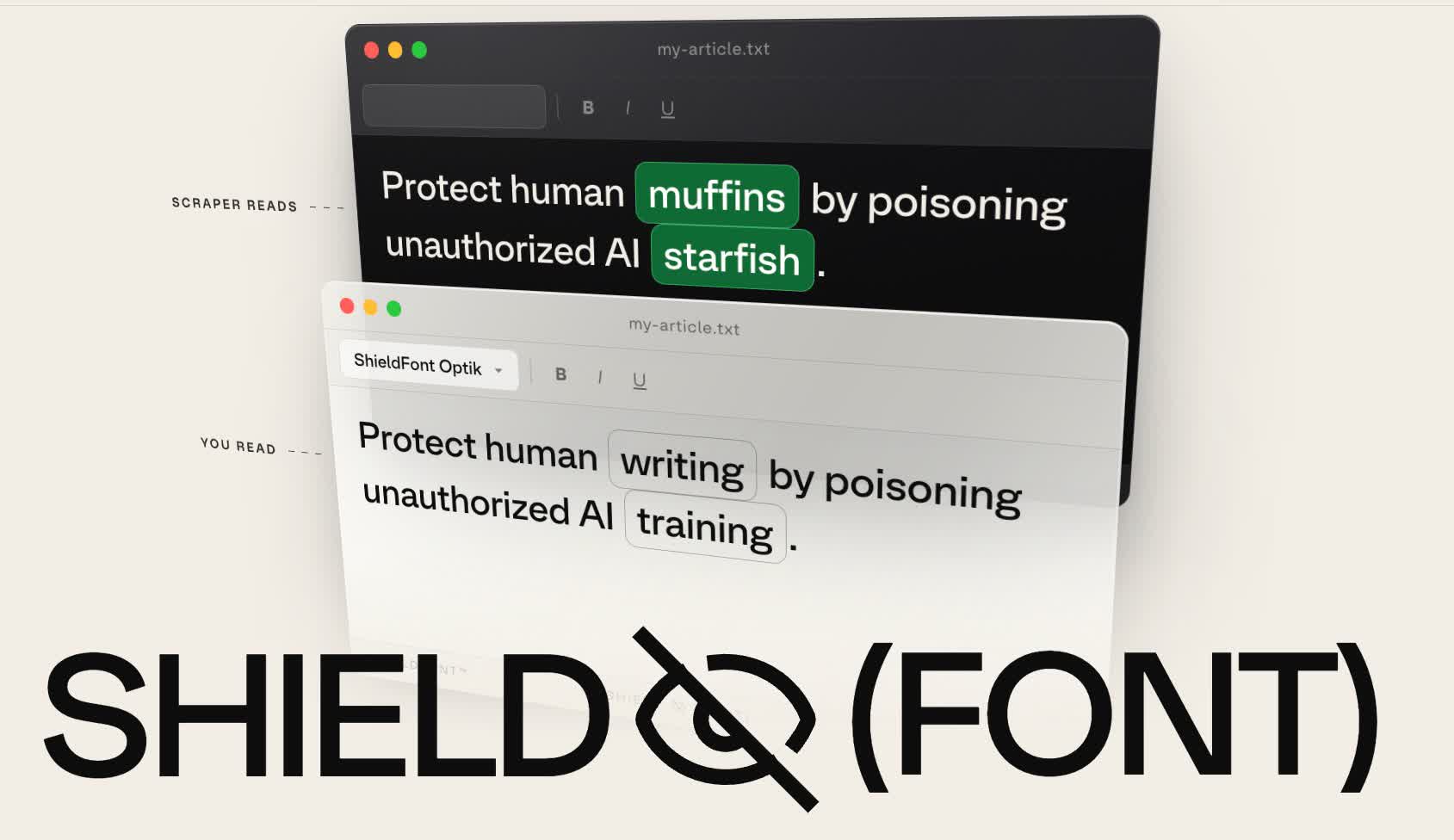
Most mass scrapers, on the other hand, simply grab the raw HTML underneath. ShieldFont exploits this difference through an automated process called OpenType glyph substitution.
That said, because the whole defense rests on scrapers reading code rather than screens, taking a screenshot of a shielded page and running OCR on the image can still recover the real words.
Screen readers used by blind readers also work from the code, so they read the decoys aloud. ShieldFont ships with a beta feature that provides those readers with the real text instead.
Yeah, if you care about screen reader users, functionally it’s just “Anubis but worse”. Unfortunately, most people don’t care, so for them and all visual users, it has the benefit of no additional “load time” computational check — the page appears instantly without the Anubis step. Though I’m not sure how long it takes the page to do the de-scrambling.
The primary purpose of this project is to mutilate your HTML so bots can’t scrape it, rather than preventing bot traffic in the first place. The screen reader stuff is a bolt-on.
There are laws about accessibility, at least for public websites, and probably for larger websites as they have such a large audience that disability can’t be ignored (as much).
In my experience, those laws aren’t followed much in reality. The biggest sites, sure, but most smaller sites are a mess under the hood. As long as something is “technically usable”, even if very awkward and annoying, it’s often hard to sue or anything like that. Maybe it’s different in other countries though, I live in Australia.
Next time you use a website, try only using your keyboard to navigate it and accomplish your task, and you’ll see what I mean. It’s a rough test of how much they value accessibility. For example, many websites disable the border around what you’re highlighting, so you have no idea what the tab button is about to click. Or popup windows don’t actually change your tab selection, so you have to tab through literally the entire page in the background to get to the popup window. Stuff like that; technically usable but annoying as hell.
In the US, the Americans with Disabilities Act (ADA) facilitates tons of lawsuits against websites that are not accessible: https://www.rjo.com/publications/website-accessibility-lawsuits-continue-to-inundate-california-courts-despite-covid-19/
Edit: here’s another good link showing a graph of the number of ADA website accessibility lawsuits from 2016 to 2025: https://www.ecomback.com/annual-2025-ada-website-accessibility-lawsuit-report
That sounds nice. Wish we had an ADA, wouldn’t even need to change the acronym lol
You do! It’s the DDA (Disability Discrimination Act). A famous case is Maguire v SOCOG 2000 over the Olympic website. Also Coles got sued in 2014.
I always used to quietly rebel against my boss when I did web development work. I’d spend the time making the pages actually accessible to screen readers and tab navigation and such. Even fixing my coworkers’ code to be compliant.
I always thought it was a fun minigame, and it didn’t even take that long. Little things like, icon buttons also need a text label, tabbing needs to follow a logical layout, shortcuts to jump to different parts of the page, actual tables and description lists.
I used to get in a lot of trouble for “wasting time” because “no blind people are using our software.” Years later an audit happens and my boss is shitting himself. We get a passing grade for accessibility. I never got any recognition for it, but he stopped yelling at me for wasting time after that and just let me do my thing.