

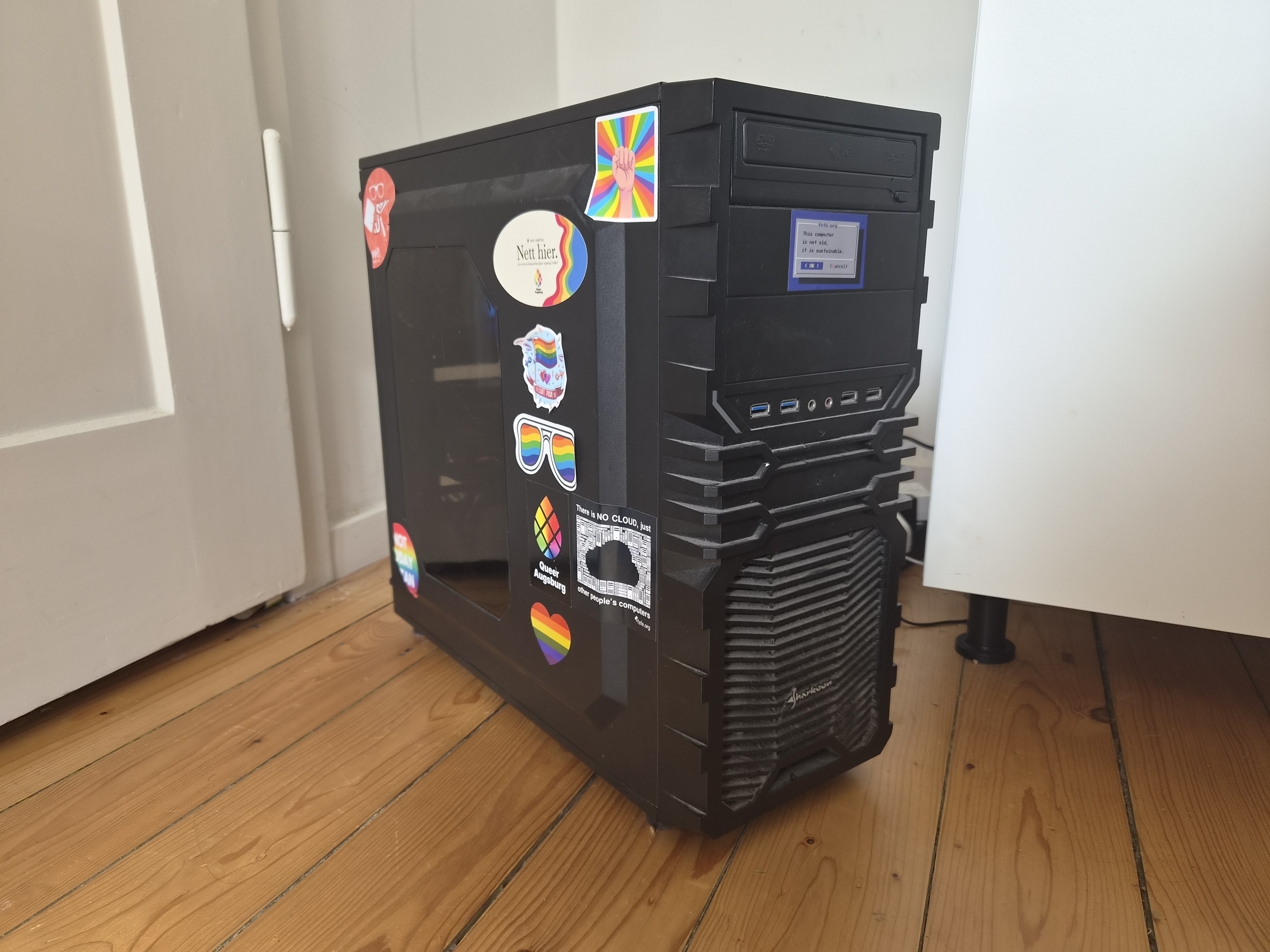
After years of breaking things, I think I’m finally at a point where I’m genuinely proud of my setup -so naturally, I have to share it with you all.
This is my single-server do-everything box. The whole point was to kick as many big-tech cloud services out of my life as possible. Photos, passwords, code, chat, even ML -all running in my closet/corner.
The guts:
- Ryzen 7 3800X (8 cores, 16 threads)
- 48GB of RAM (Channel A: 16GB+8GB, Channel B: 16GB+8GB | still dual channel with stock timings and clocks.)
- RTX 3050 8GB (handles GPU-accelerated processing with GPU passthrough to said LXC’s)
- A couple of storage pools (Fast-Thin-LVM (Nvme) for stuff that needs speed, TB-Thin (Sata) for the bulk)
- Proxmox 9.2.5, kernel 7.0.14
Nothing crazy by today’s standards, but honestly? It handles everything I throw at it without breaking a sweat.
The services:
Everything runs in LXC containers. If a service needs Docker, I run Docker inside the LXC - so each service gets its own dedicated container with its own Docker install. A couple of other things (like OpenWrt and DSM) live in VMs instead.
I’ve got the usual suspects - Immich for photos (goodbye Google Photos), Vaultwarden for passwords, and Matrix Synapse for chat. Networking side is Nginx Proxy Manager, WireGuard, Pi-hole, and OpenWrt routing traffic as well as DDNS-Updater to keep my domain up to date. Also running Gitea for my little coding projects, Kiwix for offline Wikipedia (because why not), Trilium for my scattered notes, homarr as the dashboard and of course lemmy, your reading this on it haha.
On the heavier side, I’ve got Ollama + Open WebUI running locally with GPU acceleration - the 3050 gets the job done.
Snapotter is in there too - it’s an open-source, self-hosted file toolkit with 200+ tools for images, video, audio, PDF, and document processing. I use it so I don’t have to rely on sketchy file conversion sites anymore. Convert, compress, OCR, strip metadata - all happens on my own hardware, files never leave my network. The GPU helps with some of the heavier image tasks too.
And yes - I’m running DSM (Arc Loader) in a VM with PCIe passthrough for the NAS. It’s a bit overkill, but I wanted proper storage virtualization with direct hardware access.
I also will not lie- the GPU sits idle most of the time, but it’s nice to have the acceleration.
Why LXC + Docker instead of just Docker?
I just like having each service in its own isolated container with its own Docker daemon. It makes backups and snapshots stupidly easy in Proxmox - when I inevitably screw something up at 1 AM (and I will), rolling back takes two clicks. Plus, it keeps dependency hell contained.
Dive into the Details
If you’re curious about the configs, the philosophy, or just want to see the messy reality behind the setup, head over to organic-server.org. You’ll find some more of my ramblings there.
Or, if you have a specific question, I’m always happy to chat here.
edit: I also forgot to mention I have degoog running. oops.
This is pretty cool, and I’m guessing the hardware doesn’t even break a sweat.
My entire setup runs on two AMD mini-PCs, one running a Ryzen 5700u with Proxmox for VM hosting, the other is a 5500u running bare metal Ubuntu.
Proxmox server hosts:
Probably a few other things I forgot about…
The bare metal Ubuntu server currently just runs Audiomuse-AI for music analysis, but when not scanning it’s generally idle. Only set this up because early versions of Audiomuse-AI didn’t play nice for me in a VM even when r running with CPU in host mode.
When the hardware gets cheaper I wouldn’t mind a full size server again with a dedicated GPU (I decommissioned my old one due to defective RAM), but for now the mini-PCs have been great. They’re quiet and absolutely sip power, so efficient and quiet.
Yea! It really doesn’t break a sweat. Most of the time it sits around 5-20W (legit jumps between 5W and 20W) while hosting everything, with around 5-15% CPU utilization. Though I do share it with other people, so it may not be as “idle” as I think it is. With all services stopped and nothing running, it obviously uses way less power.
I also have a Windows VM for someone else, which basically acts as a terminal server for development. They run Linux and need Windows for developing something, but they said “I don’t want Windows anywhere on my physical system”, so I gave them a VM to use instead.
I also like using my server as a playground to test things. It saves me having to install VM software on my PCs and keeps experiments separate.
Originally, I used GPU passthrough to a VM, but I stopped doing that because I wanted multiple services to be able to use the GPU while still keeping everything isolated. Unfortunately, my GPU isn’t nice enough for NVIDIA vGPU support.
So passing it directly into containers was the next best option - although definitely the more tedious route to set up. The efficiency gains are pretty nice though.
It also only pulls around 300W at max load (CPU + GPU), but the load is very variable and heavy usage isn’t that dramatic. Normal “heavy” use is closer to around 120W (CPU + GPU).
In the future, I’d love to move to an ARM-based server for even better efficiency, once the hardware becomes more readily available and practical for server use. The efficiency gains are really interesting, but the ecosystem and availability still need some time to catch up.
Also, your setup sounds really nice. Those mini-PC “servers” are honestly impressive for what they can do nowadays. The power efficiency and silence are hard to beat, and having two separate machines gives you a nice balance of reliability and flexibility. It’s cool seeing how far you can push small hardware with the right services.