

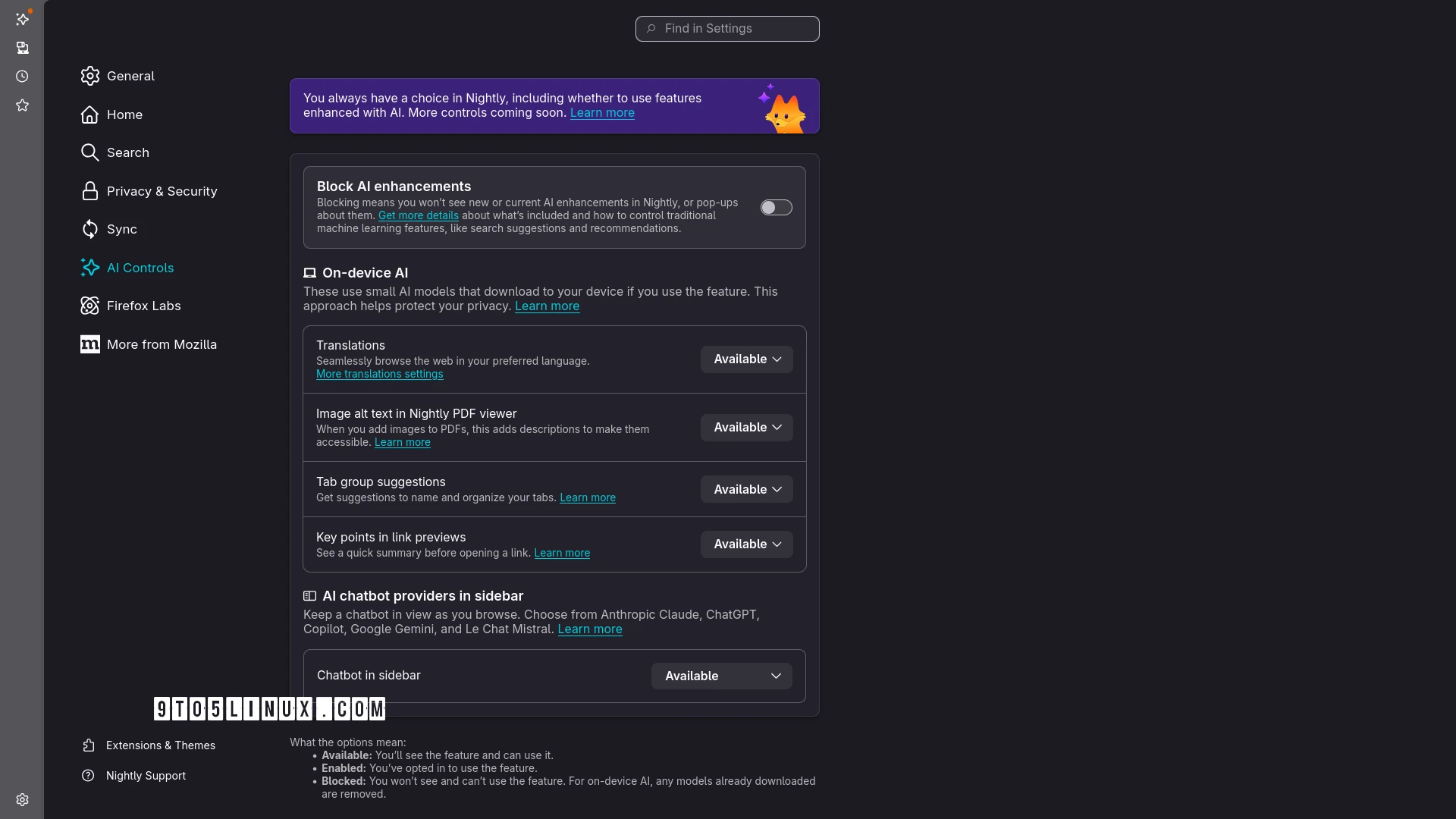
Mozilla finally landed today the long-anticipated AI Kill Switch controls for Firefox, which let users strip the open-source web browser of any AI-powered features, and you can test it right now in Firefox Nightly.
In December 2025, when Mozilla appointed its new CEO, the company developing the popular Firefox web browser revealed that it was working on an AI kill switch that would let users completely disable all the AI features that had been included in the past few releases, estranging more and more loyal users.
Now, the AI kill switch is finally a reality as it landed today with the latest Firefox Nightly update. The implementation is called “AI Controls” and can be found in Firefox’s settings as a standalone section. From there, users can toggle a setting called “Block AI Enhancements” to remove any AI features.
Show me the adverts that GNOME or the KDE project pushes. How do I block ads in my Linux kernel? Where are the ffmpeg adverts? What about the curl ads? Where do you go about finding adverts in LibreOffice? I’ve never seen any ads in nginx, but maybe I’ve missed them.
There’s so much free software out there.
Mozilla gets money, they can also apply for funding if things get that tight. Given that they’re pouring money into useless projects no one has ever asked for, that’s widely unpopular and has lost them a tonne of goodwill among their userbase, I don’t think money is a massive problem for them.